Showing posts with label bean. Show all posts
Showing posts with label bean. Show all posts
Friday, April 21, 2017
CORBY2 Firmware Jelly Bean
CORBY2 Firmware Jelly Bean

* Notification Bar
* Screen Lock Improved
* Semi-Android Homescreen
* Semi-Android Menu
* Screen Lock Music Player
* Calculator Changed
How to Install this Firmware ?
1.Download the Firmware here : http://adf.ly/QB1OG
2.Download Multiloader v5.61 here : http://adf.ly/iG8il
( If link doesnt work, try searching another from Google )
3. Open Multiloader.Click CSC and then inject the firmware you have downloaded.
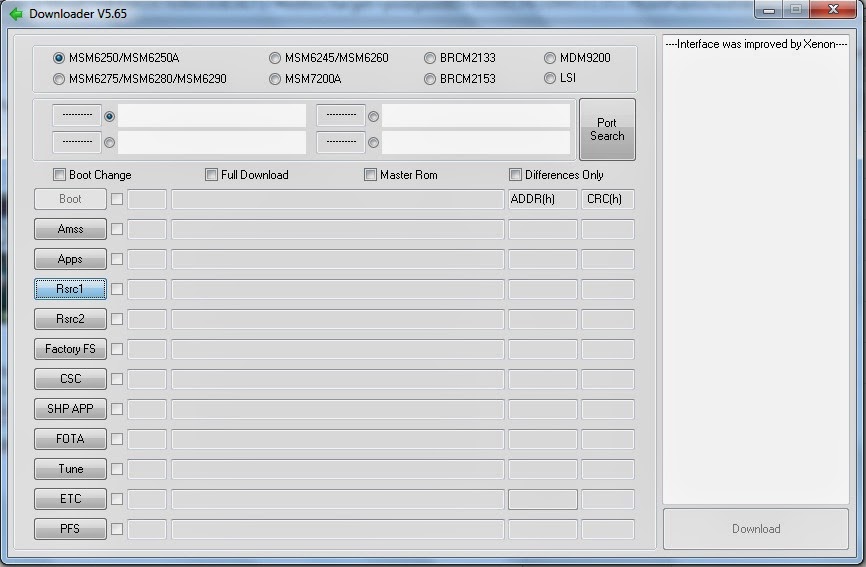
4. Now turn your corby off and then set it to download mode.
How to set to download mode?
Press and Hold VolumeDown+LockScreen+CallButton.
5. Connect your Phone on your computer using Samsung USB Cord. If your computer wont detect your device then you should download Samsung USB Driver: Download here: http://adf.ly/QhzLw
6. Going back to the multiloader, Click "PORT SEARCH" and then "Download".
7. Wait until installation is done.
If you have problems,clarifications or questions please leave a comment.
NOTE: Credits to the owner. CorbySociety do not intend to own this file.
Go to link Download

Thursday, January 19, 2017
CORBY2 Firmware Android Jelly Bean RC1
CORBY2 Firmware Android Jelly Bean RC1

* Android-Based Menu
* Android Home Screen
* Android Notification
* Semi-Android Looks
* Android Screen Lock
How to Install this Firmware ?
1.Download the Firmware here : http://adf.ly/Wrgu3
2.Download Multiloader v5.61 here : http://adf.ly/iG8il
( If link doesnt work, try searching another from Google )
3. Open Multiloader.Click Rsrc1 and then inject the firmware you have downloaded.

4. Now turn your corby off and then set it to download mode.
How to set to download mode?
Press and Hold VolumeDown+LockScreen+CallButton.
5. Connect your Phone on your computer using Samsung USB Cord. If your computer wont detect your device then you should download Samsung USB Driver: Download here: http://adf.ly/QhzLw
6. Going back to the multiloader, Click "PORT SEARCH" and then "Download".
7. Wait until installation is done.
If you have problems,clarifications or questions please leave a comment.
Go to link Download
Sunday, January 8, 2017
CORBY2 Firmware Jelly Bean 2
CORBY2 Firmware Jelly Bean 2

Features :
* Semi-Android Notification Bar
* For SMS and Calls
* Semi-Android Screen Lock
* Widget-Dock / Bar Changed
* Navigation Icons Changed
* Screen Lock Music Player Changed
* Calculator changed
* Clock Dock Changed
* Semi-Android Menu
* Version 2
How to Install this Firmware ?
1.Download the Firmware here : http://adf.ly/QB1OG
2.Download Multiloader v5.61 here : http://adf.ly/iG8il
( If link doesnt work, try searching another from Google )
3. Open Multiloader.Click Rsrc1 and then inject the firmware you have downloaded.
4. Now turn your corby off and then set it to download mode.
How to set to download mode?
Press and Hold VolumeDown+LockScreen+CallButton.
5. Connect your Phone on your computer using Samsung USB Cord. If your computer wont detect your device then you should download Samsung USB Driver: Download here: http://adf.ly/QhzLw
6. Going back to the multiloader, Click "PORT SEARCH" and then "Download".
7. Wait until installation is done.
If you have problems,clarifications or questions please leave a comment.
NOTE: Credits to the owner. CorbySociety do not intend to own this file.
Go to link Download
Tuesday, November 29, 2016
Download Adobe Flash Player For Android Jelly Bean ICS Gingerbread and Honeycomb Versions
Download Adobe Flash Player For Android Jelly Bean ICS Gingerbread and Honeycomb Versions

In this post i included the download links of Adobe flash player apk files which you can download and manually install using any file Explorer.
Adobe Flash Player For Jelly Bean and ICS ( Ice Cream Sandwich )
Adobe flash player v11.1.115.69Adobe Flash Player For Gingerbread and Honeycomb
Adobe flash player v11.1.111.64source
Go to link Download
Subscribe to:
Comments (Atom)