Showing posts with label beta. Show all posts
Showing posts with label beta. Show all posts
Tuesday, March 14, 2017
CORBY2 Apps Skype BETA
CORBY2 Apps Skype BETA

* Skype Beta for Coryby 2
* Wifi Access needed
* Stay connected through Skype Mobile
* Sign in using your Skype Account
* Create account on your Skype Mobile
* Start Video chat
* Stable connection is required
* Virtual Keypad
* Easy-to-use with

Skype Description:
Skype is an IP telephony service provider that offers free calling between subscribers and low-cost calling to people who dont use the service. In addition to standard telephone calls, Skype enables file transfers, texting, video chat and videoconferencing. The service is available for desktop computers, notebook and tablet computers and other mobile devices, including mobile phones. A number of companies, including Skype, produce dedicated Skype phones.
Included in the free service is a softphone application that can be downloaded to any computing device running Windows, Macintosh, Linux, or Windows Mobile operating systems. A function called SkypeOut enables calls to regular telephones; these calls are charged to a prepaid account or to a flat-fee annual subscription.
Skypes benefits, beyond the free and low-cost calls, are said to include easy set-up and good audio quality. To use Skype from a desktop computer, you just plug in a headset, a specialized VoIP phone or a regular phone (via an analog telephone adapter). You add contacts similarly to the way you do for instant messaging and then, to make a call, just click the icon next to the contact.
( Information by Google )
How to install this App.
1.Download the App here : http://adf.ly/QB1iL
2.Put it on your phone by :
* Putting it on your Memory Card
* Connecting to your PC by using Samsung USB
3.Open the file and your ready to install it.
NOTE: Credits to the owner. CorbySociety do not intend to own this file.
Go to link Download

Saturday, December 3, 2016
CORBY2 Firmware Ui Beta Fix for CORBY2
CORBY2 Firmware Ui Beta Fix for CORBY2
 Ui Beta ( Semi-Android Mode ) for Corby 2
* Semi-Android Looks
* iPhone-Based ScreenLock
* Easy-to-Change Wallpaper
* Semi-Android Calculator
* Shortcut Buttons
* Some Keys wont work
* Visually Attractive
How to Install this Firmware ?
1.Download the Firmware here : http://adf.ly/iH5Mc
2.Download Multiloader v5.61 here : http://adf.ly/iG8il
( If link doesnt work, try searching another from Google )
3. Open Multiloader.Click Rsrc1 and then inject the firmware you have downloaded.
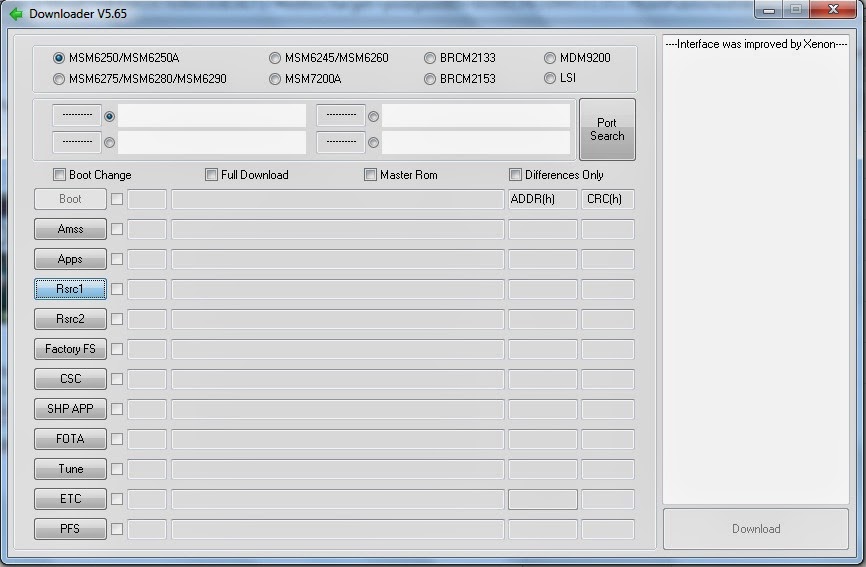
4. Now turn your corby off and then set it to download mode.
How to set to download mode?
Press and Hold VolumeDown+LockScreen+CallButton.
5. Connect your Phone on your computer using Samsung USB Cord. If your computer wont detect your device then you should download Samsung USB Driver: Download here: http://adf.ly/QhzLw
6. Going back to the multiloader, Click "PORT SEARCH" and then "Download".
7. Wait until installation is done.
If you have problems,clarifications or questions please leave a comment.
NOTE: Credits to the owner. CorbySociety do not intend to own this file.
Go to link Download
Wednesday, October 5, 2016
CORBY2 Apps WhatsAPP BETA
CORBY2 Apps WhatsAPP BETA

* WhatsApp for Corby 2.
* Exchange messages using your WhatsApp Mobile.
* Send Unlimited Images, Videos and Audio media Messages.
* Stay in touch with your friends.
* Wifi Access needed.
* Stable Connection needed.
* Create Group chat
How to install this App.
1.Download the App here : http://adf.ly/iTbc6
2.Put it on your phone by :
* Putting it on your Memory Card
* Connecting to your PC by using Samsung USB
3.Open the file and your ready to install it.
NOTE: Credits to the owner. CorbySociety do not intend to own this file.
Go to link Download
Subscribe to:
Comments (Atom)