Showing posts with label xperia. Show all posts
Showing posts with label xperia. Show all posts
Wednesday, April 12, 2017
Cusrom Xperia Z2 V1 Andromax C2
Cusrom Xperia Z2 V1 Andromax C2
Rom JelyBean
ROM : Download
Mirror : Download
# FIX BUG Dobly & SystemUI 2 sinyal : Download
- Buka Walkman masuk pengaturan nonaktifakan xload..
- Masuk CWM (wipe cache) install
Langkah-langkah :
- Simpan hasil download di SDCARD
- Masuk ke Recovery / CWM
- Wipe Data
- Wipe Cache
- Wipe Dalvik Cache
- Install ZIP
- Reboot
1. ## Biar ga FC di walkman!!
# Pas masuk langkah awal jangan dulu sigin google account !! ( lewati terus sampe home screen !! )
# Yang ga mau pake Navbar buka Build.prop di folder system hapus di barisan paling atas "qemu.hw.mainkeys=0" dengan cara pake root explorel tahan file build.prop pilih edit text.. dan komfirmasi dulu Deteksi SD Card agan dulu ( biar kebaca di divace sd-card 0 ) ...RESTART
# buka Walman masuk setelan (setting) / penigkat suara dan aktifkan (klik tobol kotak atas) langsung buka dobly dan aktifkan......... baru bisa sigin google account + facebook dan waktu sigin google dan facebook dan akan muncul FC album, walkman..biarkan saja cuma waktu itu
2. Buka Xposed.. pilih Modules, ceklis Hook Andro ( yg mau pake Navbar... ceklis juga Gravitybox ) masuk Framework / instal/updated...RESTART lagi
NB:
yg mau pake Navbar....
Buka gravitybox / Tweak navigation bar / aktifkan.. setting ukuran tinggi 60-65% dan 2 di bawahnya set aja 0% kalo biar maen game layar ga ke potong navbar..set juga transfaran statusbar 100%
3. Aktifkan keyboard xperia ( bisa di set di Settting / language & input ) dan buat ubah signal warna putih tinggal set di setting / pengaturan dual RuIM / Warna.
karana masih banyak bug dan menu yang ga pungsi di setting ory Z2 ane pisahin aja...
yang mau pake download aja..
Setting Z2 install via cwm (wipe cache) Download
NB: kalau mau pake settings Z harus dari awal pas beres flas ulang Rom !!(wifi switch GSM non aktif)
Thanks to :
- Tuhan yang maha esa
- Xda developer
Yang mau donasi bisa melalui pulsa modem di nomor 08893611591
Go to link Download

Monday, March 13, 2017
CORBY2 Widget XPERIA
CORBY2 Widget XPERIA
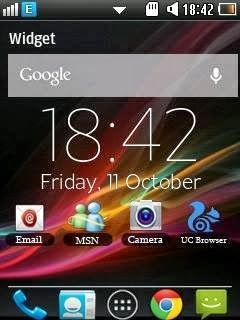
Package includes:
* Xperia clock
* Xperia Google Search
* Xperia Shortcut Icons
* Date & Time
* Firmware Match with Android Jelly Bean RC1 Firmware
* Extra Tags
* Corby 2 Mod
* Corby 2 Firmware
* Corby 2 Firmware update
* Samsung GTS3850 Firmware
How to install this widget.
1.Download the Widget here : http://adf.ly/jq2If
2.Extract the File
3.Put it on your phone by :
* Putting it on your Memory Card
* Connecting to your PC by using Samsung USB
4. Open the file and your ready to install it .
Make sure to extract the files before putting it on your phone.
NOTE: Credits to the owner. CorbySociety do not intend to own this file.
Go to link Download
Friday, December 16, 2016
Dirty Unicorns 4 3 1 Huashan v4 0 for Sony Xperia SP
Dirty Unicorns 4 3 1 Huashan v4 0 for Sony Xperia SP


This ROM is based on the Android Open Kang Project (AOKP). The idea to start a ROM based off AOKP with added features for us was started out of curiosity and boredom. We started compiling ROMs for personal use and later started sharing them. After sharing it with a few people, we decided to take it a step further and fine tune the way we do things. Since then, is been nothing but fun and a true learning experience for all of us involved. Weve received high praise from not only users but fellow developers of other ROMs that enjoy seeing things done the right way. Our 4.2.2 version made it onto various devices to include the HTC One, Galaxy Nexus, HTC EVO 3D, HTC EVO LTE, Nexus 4 and some other devices. We hope to do the same with our 4.3 version.

- Facebook Sync Hack
- Expanded desktop
- Hot Reboot Option
- Ribbons (AOKP)
- Customizable Quick Settings
- Custom "BAMF" Theme engine
- Customizable power menu (Torch, Profiles, etc)
- Customizable lockscreen buttons and sliders
- Missed call breathing notifications
- App Ops access in Settings
- CM Powerwidget
- CM Profiles
- CM apps (Apollo, DSPManager, CMFileManager, etc)
- SlimROMs TRDS (built in theme in settings)
- SlimROMs Statusbar Clock options
- Transparent Statusbar and NavBar Options
- Halo from Paranoidandroid
- Halo bubble color changer
- Halo size changer
- Multi-user support
- Customizable Softkeys
- 24+ Battery options
- Network speed indicator in statusbar
- Koush Superuser
- Nav Bar customizations
- Host file switcher (ad-free switch)
- Build Propper
- Active Display (Moto X notifications)
- Wakelock blocker
- Suspend Actions (power saving mod)
- ListView Animations
- Custom System Animations
- Swipe to Switch in RC (toggle)
- Lockscreen Tint Color Mod
- Weather Panel
- Change lockscreen wallpaper
- OTA updates via DU Updater
- Custom BusyDialog
- Advanced Low Battery Indicator options
- Music/Halo toggle/tiles
- ScreenShot QuickTrash
- MIUI-like carrier in statusbar
- Paranoidandroid PIE
- Recents Shortcut bar
- Color Changing PhaseBeam LWP
- Much More, just look in Settings and ENJOY!!!
- Much more customization (just flash and get Dirty)
- Believe it or not, this ROM has even more stuff than PAC?!
 (includes multiwindow support like the Galaxy S Series phones) See here
v4.0 - Kernel Source
v4.0 - Device Tree

- Make sure you are on an UNLOCKED bootloader
- Have a custom recovery (TWRP)
- Wipe /data (or cache and dalvik cache if you are coming from an older version).
- Move the ROM zip to your phone
- Flash it and reboot
- Once the ROM boots, reboot back into recovery
- Flash the recommend GAPPS and ENJOY!!

DOWNLOAD
4.3 GAPPS


Go to link Download
Subscribe to:
Posts (Atom)