Showing posts with label mobile. Show all posts
Showing posts with label mobile. Show all posts
Friday, March 17, 2017
Download adb driver for your android mobile tablet
Download adb driver for your android mobile tablet

Download adb-driver and device driver in a single package . the file also install adb and fastboot in your pc . the download file was given at the right side .the download file was zip file extract the file adb Drivers allows you to connect your Smartphone and Tablets to the computer without the need of any software. It helps users to easily connect your smartphone and tablet to the computer and transfer data between the Smartphone and computer. Here, on this page the Official adb drivers let us see the steps to install the adb driver
STEPS TO INSTALL
STEP 1: Download the package from the above link and extract the zip file using winzip or any other your wish and execute adb-driver the blue screen will displayed like below pic
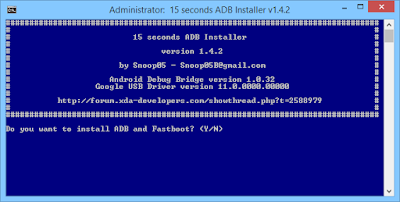
STEP 2: Enter Y in the keyboard to install ADB and Fastboot in your PC below pic will show you how it look like

STEP 3: Again enter Y to install the ADB in System-Wide below pic will show you how it may look like

STEP 4: After that adb and fastboot was sucessfully install in your pc asking for install device driver in your pc again enter Y in the keyboard after that device driver was install in your pc below pic will show you how it may look like

Finally adb,fastboot and device driver was sucessfully install in your pc :-)
Go to link Download

Thursday, February 9, 2017
Download 3G Watchdog mobile data
Download 3G Watchdog mobile data

* Advanced data usage prediction
* Billing rules (counts in blocks, ignores uploads, exclude apps, exclude time periods)
* Usage history with graph & CSV export
* Usage by application (Android 2.2+, unavailable on Dell Streak)
* 5 widget styles
* Backup/restore
* Redesigned UI
* Account/SIM with auto switch (requires a phone with a SIM)
* Import settings & data from 3GW free (dont uninstall 3GW free before importing!)
Download Pro!
Go to link Download
Monday, December 19, 2016
CORBY 2 Apps 200 240x320 Mobile Games
CORBY 2 Apps 200 240x320 Mobile Games

Game Lists:
* 3DBallonRace
* 7zwerge
* 1000Words
* 2020SpecialOps
* AbsolutePuzzle1
* Actraiser
* AfterDarkUnderTheMoonLight
* AH-6NavyBattle
* Aleste
* AliBaba
* AlonsoRacing
* AmazingPocketDecider
* AnimalLand * DeepSnow
* Anno1503 * DeerHunter
* Apocalypse3000 * DerbyChamp
* Aquarace * DesktopGolf
* ArcticX-Mas * DextersLaboratorySecurityAlert
* AsphaltUrbanGT * Diamond
* AtariConnectFour * DieHard
* AztecWarrior * DoubleCross
* BackGammon * DragonFire2Episode1
* BaldursGate * DragonStone
* BallonHeadedBoy * Drakengard
* BattleOfEmpires * Driver
* BeBall * DustNDirt
* Big2Heroes * EdEddnEddy-GiantJawbreakers
* Big2Popstars * EgyptQuestII
* BigBrother * EuromanEaster
* BitFilmGame * ExodusShootingGame
* BladeTrinity * ExoticEves
* BobbyCarrot * FantasyWarriors2Evil
* BoobiSisters * FantasyWarriors2Good
* BoulderDashME * FarmRacing
* Bowlenm.Bohlen * Fartbox
* BrotherBear * FatalForce
* BubbleGun * FearFactor
* C2SBowling * FerrariMonteCarlo
* CandyCatchup * FIFA2005
* CarSexKamasutra * FiremanBob
* ChessBuddy * ForsakenFortress
* Chessmaster * FruitEscape
* ChickenHunter * FruitPunch
* ChineseChess * Gangland
* ClassicSolitaire * GhostsnGoblins
* ClearOut * Gintris
* ColinMcRally2005 * GirlsGamble
* Commando1 * GoldRush
* Commando2 * GulosTale
* Commando3 * Heart2Heart
* CookAMania * HeikkiSorsaBX
* CouragetheCowardlyDog * HelloKittyBoogieWoogie
* CrazyBoy * HighwayRacer
* CricketWorldChampionship * Hoverball
* CyberPaw * JamaicanDiscsta
* DamageSan * JokoSoko
* DancingSweety * Jump!Jump!Jump!
* JungleCommando * Sphinx
* JustImpact * Splashdown
* Kamasutra * SplinterCell
* KamasutraSpecial * SplinterCell2
* Kamasutris * SplinterCell3
* KamikazeQuest * SpongebobBowling
* KOKickboxing * SteepleChaseChallenge
* Lagsters * StreetSoccer
* LarrySexyGame * Strip4YouJennaJameson
* LotrTwoTowers * StripBlackjackChrissy
* MahjongCombo * StripBlackjackChrissy
* Manapack02 * StripBlackjackGeena
* Manapack03 * StripBlackjackRachel
* MarcelDesaillyProSoccer * StripBlackjackVictoria
* MaskedRiderPowerBattle * StripTakToe
* MayhemsMagicDust * SuperBomberman
* MazechaseNightmare * SuperYumYum
* Meta * TacTix
* MetalSlug * TankAssault
* MightAndMagic * Tenchu
* MobileJockey * TheMummy
* Monopoly * ThunderRacing
* MovistarRacing * T-MobileTeamCycling
* Naruto * TomandJerryCheeseChase
* NewSkoolSkater * TombRaider2
* NinjaRun * TonyHawkUnderground
* NYNights * Townsmen2
* OverloadedDecathlon * TrafficJam
* PahTum * VampireBloodline
* PamelaAnderson * VijaySinghProGolf2005
* ParisDakar * VRally
* PinballDream * WackyRaces
* PocketGolf * Warmonster
* PortRoyale2 * WorldFighting
* PowerGames * WormsForts
* PrinceofPersia3 * WormsGolf
* PubPool * XmasSkies
* PursuitSquad * XR-JetSki
* QuestofFinalFantasy * Go to link Download
Monday, October 24, 2016
Domestic Sim Unlock For T Mobile AT T or MVNOs Solved N900P
Domestic Sim Unlock For T Mobile AT T or MVNOs Solved N900P
I finally cracked how to domestic unlock the N900P (Sprint Note 3) for use with T-Mobile/AT&T or any other U.S. GSM Carrier. Im writing up the tutorial now and finishing up the tools required to make it a little easier. However i spent over a month working on this and am asking for donations before i release the tutorial. As much as i hate to do it my car is on its last leg and i desperately need to find a new one. So please help me out as i hope getting this phone unlocked helps you all. Im currently using mine on Straight Talk (cant beat $45/Mo using AT&T Towers). This is a fairly simple procedure it just has quite a few steps but if you follow every step to the letter it is cake. I am really trying to get to around $2000 just to find myself a little clunker so any donation is appreciated. I will post up a video for proof that i have accomplished this just so you all know this is not any kind of scam.
Disclaimer: YOU MUST HAVE YOUR DEVICE INTERNATIONALLY UNLOCKED FROM SPRINT FOR THIS TO WORK. I AM WORKING ON INTERNATIONALLY UNLOCKING WITHOUT SPRINT BUT IT IS REQUIRED IN THE MEANTIME. ALL OTHER TOOLS REQUIRED I WILL PROVIDE. YOU DO NOT NEED AN ACTIVE SIM CARD IT WILL SHOW BARS AND CARRIER INFO WITH INACTIVE CARD.
Disclaimer 2: ROOT IS REQUIRED FOR MULTIPLE STEPS AND THIS PROCESS WILL MORE THAN LIKELY TRIP KNOX. I AM WORKING ON A WAY AROUND THIS BUT IN THE MEANTIME THE MOST EFFECTIVE WAY DOES TRIP KNOX. YOUR WARRANTY IS NOW VOID!
Disclaimer 3: IF YOU BREAK YOUR PHONE THEN YOU BROKE YOUR PHONE I AM IN NO WAY RESPONSIBLE. (I BRICKED MY PHONE MANY TIMES TRYING TO FIGURE OUT THIS PROCESS A SIMPLE ODIN FLASH AND WAS GOOD TO GO.
MODERATOR EDIT - Comments removed
YOUTUBE VIDEO SHOWING SPRINT NOTE ON AT&T GO PHONE PLAN: WATCH
Tutorial to Unlock Sprint Galaxy Note 3 For T-Mobile/AT&T/MVNOs
Tools required:
Hidden Menu Enabled(modified for galaxy note 3): http://adf.ly/cVSkO
MI3 modem (modified to be flashed via odin): http://adf.ly/cVSqE
Odin 3.07 or 3.09 (google for it theres a million mirrors of it)
Device must already be internationally unlocked via sprint for this to work (must perform uicc unlock from system updates menu) im working on a way to do this without sprint but for now this is how it is)
Region Lock Away: (Free on chainfires thread or consider buying market donate version) LOOK
Device must be rooted: (rooting via this method will trip knox however the modem flash we have to do will likely trip it as well): CHAIN FIRE 3D
Any root browers from play store
ServiceMode Shortcut: Grab from play store
prl helper or anything with an apn shortcut: Grab from play store
Step 1: We need to root the device so put device in download mode holding vol down+home+power while it is off. Flash cf auto root to obtain root (this will void knox).
Step 2: Grab a root browser, ServiceMode Shortcut, PRL Helper, and Region Lock Away and install your att/tmobile sim.
Step 3: Place device back into download mode. PAY ATTENTION HERE: you need to add the mi3 modem to pda and uncheck auto reboot. LEAVE ON F. RESET TIME CHECKED. After flash has completed remove battery from your phone place it back into download mode and flash mi3 modem again this time leaving auto reboot checked. When your device boots up to to settings->general->about device and check your baseband version to make sure it ends in mi3. if it does not redo step 3.
Step 4: Run regionlock away (not required for this all to work just for good measure), And switch your device into gsm/umts only mode in your settings menu.
Step 5: Plug your device in and enable usb debugging. run hidden menu enabler. open TestMode Menu. Follow these steps perfectly.
1. click ue setting and info
2. click setting
3. click protocol
4. click as- go to security control and make sure fake security is on, ciphering is off, and integrity is on. after you have seet these hit menu back twice to get back to ue setting and protocol menu.
5. open nas-go to network control go to band selection and pick number 5 wcdma/gsm mode only. after hit menu back.
6. Click pref mode set and choose number 2 gsm wcdma only. menu back once
7.hit aquision order and choose umts_gsm. hit menu back until youre back at ue setting menu.
8. open gcf and click number 1 and make sure it is on. hit menu back to ue settings.
9.go to sim and then sim class control. make sure umts on and gsm on both show. if not click to enable. hit menu back once
10.hit bip block control. hit number 3 bip block off. once complete go to bip block status to verify it is in fact off.
11. go all the way back to main menu. hit protocol state, sim information, check nv, and make sure it shows sim lock is disable, spr bip unblocked, and sha256 on or off shouldnt matter. ( i have had mine off and on and it seems to work either way)(mine is currently on)
12. power cycle device.
13. when it comes on device SHOULD show service it still may not.
14. get into your root browser, go system, and open your build.prop with a text editor
15. add these lines to the very bottom to enable apn editing. (credit to ingenium13)
ril.sales_code=LOL
ro.csc.sales_code=LOL
16. reboot device once more. now use prl helper or your apn shortcut and create a new apn for your carrier. delete all the sprint ones and make sure you highlight the circle next to your newly created apn. reboot once more.
17. device should come up with full service bars and data/mms active. (if you have an inactive sim card it does not always show service)(my inactive att card would show service my inactive tmobile would not)
18. Donations appreciated now you should be 100% unlocked. if you need to undo this for any reason see post 3 to get fully back on sprint.
19. Profit!
Disclaimer: YOU MUST HAVE YOUR DEVICE INTERNATIONALLY UNLOCKED FROM SPRINT FOR THIS TO WORK. I AM WORKING ON INTERNATIONALLY UNLOCKING WITHOUT SPRINT BUT IT IS REQUIRED IN THE MEANTIME. ALL OTHER TOOLS REQUIRED I WILL PROVIDE. YOU DO NOT NEED AN ACTIVE SIM CARD IT WILL SHOW BARS AND CARRIER INFO WITH INACTIVE CARD.
Disclaimer 2: ROOT IS REQUIRED FOR MULTIPLE STEPS AND THIS PROCESS WILL MORE THAN LIKELY TRIP KNOX. I AM WORKING ON A WAY AROUND THIS BUT IN THE MEANTIME THE MOST EFFECTIVE WAY DOES TRIP KNOX. YOUR WARRANTY IS NOW VOID!
Disclaimer 3: IF YOU BREAK YOUR PHONE THEN YOU BROKE YOUR PHONE I AM IN NO WAY RESPONSIBLE. (I BRICKED MY PHONE MANY TIMES TRYING TO FIGURE OUT THIS PROCESS A SIMPLE ODIN FLASH AND WAS GOOD TO GO.
MODERATOR EDIT - Comments removed
YOUTUBE VIDEO SHOWING SPRINT NOTE ON AT&T GO PHONE PLAN: WATCH
Tutorial to Unlock Sprint Galaxy Note 3 For T-Mobile/AT&T/MVNOs
Tools required:
Hidden Menu Enabled(modified for galaxy note 3): http://adf.ly/cVSkO
MI3 modem (modified to be flashed via odin): http://adf.ly/cVSqE
Odin 3.07 or 3.09 (google for it theres a million mirrors of it)
Device must already be internationally unlocked via sprint for this to work (must perform uicc unlock from system updates menu) im working on a way to do this without sprint but for now this is how it is)
Region Lock Away: (Free on chainfires thread or consider buying market donate version) LOOK
Device must be rooted: (rooting via this method will trip knox however the modem flash we have to do will likely trip it as well): CHAIN FIRE 3D
Any root browers from play store
ServiceMode Shortcut: Grab from play store
prl helper or anything with an apn shortcut: Grab from play store
Step 1: We need to root the device so put device in download mode holding vol down+home+power while it is off. Flash cf auto root to obtain root (this will void knox).
Step 2: Grab a root browser, ServiceMode Shortcut, PRL Helper, and Region Lock Away and install your att/tmobile sim.
Step 3: Place device back into download mode. PAY ATTENTION HERE: you need to add the mi3 modem to pda and uncheck auto reboot. LEAVE ON F. RESET TIME CHECKED. After flash has completed remove battery from your phone place it back into download mode and flash mi3 modem again this time leaving auto reboot checked. When your device boots up to to settings->general->about device and check your baseband version to make sure it ends in mi3. if it does not redo step 3.
Step 4: Run regionlock away (not required for this all to work just for good measure), And switch your device into gsm/umts only mode in your settings menu.
Step 5: Plug your device in and enable usb debugging. run hidden menu enabler. open TestMode Menu. Follow these steps perfectly.
1. click ue setting and info
2. click setting
3. click protocol
4. click as- go to security control and make sure fake security is on, ciphering is off, and integrity is on. after you have seet these hit menu back twice to get back to ue setting and protocol menu.
5. open nas-go to network control go to band selection and pick number 5 wcdma/gsm mode only. after hit menu back.
6. Click pref mode set and choose number 2 gsm wcdma only. menu back once
7.hit aquision order and choose umts_gsm. hit menu back until youre back at ue setting menu.
8. open gcf and click number 1 and make sure it is on. hit menu back to ue settings.
9.go to sim and then sim class control. make sure umts on and gsm on both show. if not click to enable. hit menu back once
10.hit bip block control. hit number 3 bip block off. once complete go to bip block status to verify it is in fact off.
11. go all the way back to main menu. hit protocol state, sim information, check nv, and make sure it shows sim lock is disable, spr bip unblocked, and sha256 on or off shouldnt matter. ( i have had mine off and on and it seems to work either way)(mine is currently on)
12. power cycle device.
13. when it comes on device SHOULD show service it still may not.
14. get into your root browser, go system, and open your build.prop with a text editor
15. add these lines to the very bottom to enable apn editing. (credit to ingenium13)
ril.sales_code=LOL
ro.csc.sales_code=LOL
16. reboot device once more. now use prl helper or your apn shortcut and create a new apn for your carrier. delete all the sprint ones and make sure you highlight the circle next to your newly created apn. reboot once more.
17. device should come up with full service bars and data/mms active. (if you have an inactive sim card it does not always show service)(my inactive att card would show service my inactive tmobile would not)
18. Donations appreciated now you should be 100% unlocked. if you need to undo this for any reason see post 3 to get fully back on sprint.
19. Profit!
Go to link Download
Sunday, October 16, 2016
CORBY2 Apps Green Farm mobile
CORBY2 Apps Green Farm mobile
 GreenFarm for Samsung Corby 2
 * Live like in the Farm
* Care for Plants and Animals
* Earn money and buy some goods
* Meet your neighbors
* Level-up and unlock items
* Compete with your neighbors
* Plant Trees
* Build your own farm
You can create your own farm in the new game of Green Farm from Gameloft company. Play where you can at any time and anywhere! Create your own farmer with unique characteristics and put him in fancy clothes, get your farm and various animals. Making money you can buy improvements, additions to the successful maintenance of your farm, for example, you can buy even tractors. Keep your farm
*You really like living at the farm, care for plants and animals to breed.
* The money you earn you can spend on seeds, animals and even buildings for your farm!
* Visit your neighbors and play mini-games to earn coins and XP.
*Compete with your neighbors and determine the best gardener
*Customize your avatar, collect bonuses and get a cool tractor

How to install this App.
1.Download the App here : http://adf.ly/iGsWn
2.Put it on your phone by :
* Putting it on your Memory Card
* Connecting to your PC by using Samsung USB
3.Open the file and your ready to install it.
NOTE: Credits to the Gameloft Company. CorbySociety do not intend to own this file.
Go to link Download
Subscribe to:
Posts (Atom)