Showing posts with label blue. Show all posts
Showing posts with label blue. Show all posts
Friday, January 20, 2017
CORBY 2 Theme Blue VAIO
CORBY 2 Theme Blue VAIO
 Blue VAIO for Corby 2
* Semi-iPhone icons
* Semi-Android top icons
* Blue VAIO wallpaper
* Green labels
* Simple Gray background
* Gray borders
* Slightly attractive
How to install this Theme.
1.Download the Theme here : http://adf.ly/iNqua
2.Put it on your phone by :
* Putting it on your Memory Card
* Connecting to your PC by using Samsung USB
3.Open the file and your ready to install it.
NOTE: Credits to the owner. CorbySociety do not intend to own this file.
Go to link Download

Friday, December 30, 2016
CORBY 2 Theme Blue Icon Theme
CORBY 2 Theme Blue Icon Theme
 Blue Icon Theme for Corby 2
 * Shiny Blue Icons
* Full Light Blue Borders
* Clean Design
* Greenish Labels
* Smooth Wallpaper
* Visually Attractive
* Top icons improved
* Fits with any Firmware
* Free to Download
How to install this Theme.
1.Download the Theme here : http://adf.ly/iGHco
2.Put it on your phone by :
* Putting it on your Memory Card
* Connecting to your PC by using Samsung USB
3.Open the file and your ready to install it.
NOTE: Credits to the owner. CorbySociety do not intend to own this file.
Go to link Download
Thursday, December 29, 2016
CORBY2 Firmware Android Invisible Lock Blue 1 2
CORBY2 Firmware Android Invisible Lock Blue 1 2

* Semi-Android Menu
* Blue menu
* Widget Dock Changed
* Calculator Changed
* Version 1.2
* Extra Tags
* Firmware
* Corby 2 Firmware
* Android Firmware
* Corby 2 MoD
* GTS3850 Firmware
How to Install this Firmware ?
1.Download the Firmware here : http://adf.ly/Qhxxe
2.Download Multiloader v5.61 here : http://adf.ly/iG8il
( If link doesnt work, try searching another from Google )
3. Open Multiloader.Click CSC and then inject the firmware you have downloaded.
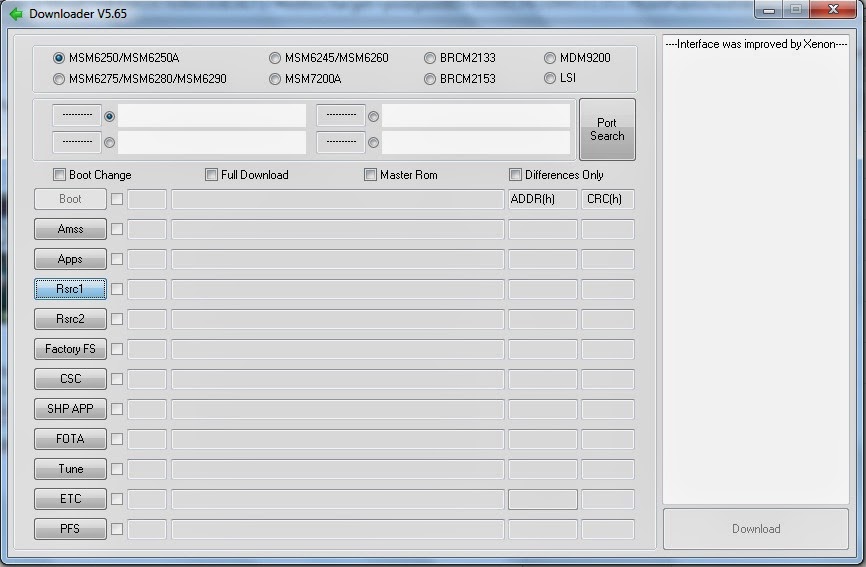
4. Now turn your corby off and then set it to download mode.
How to set to download mode?
Press and Hold VolumeDown+LockScreen+CallButton.
5. Connect your Phone on your computer using Samsung USB Cord. If your computer wont detect your device then you should download Samsung USB Driver: Download here: http://adf.ly/QhzLw
6. Going back to the multiloader, Click "PORT SEARCH" and then "Download".
7. Wait until installation is done.
If you have problems,clarifications or questions please leave a comment.
NOTE: Credits to the owner. CorbySociety do not intend to own this file.
Go to link Download
Sunday, November 27, 2016
CORBY2 Theme Blue and Pink Cotton Candy Version 2
CORBY2 Theme Blue and Pink Cotton Candy Version 2

it on your blog, you must ask permission to
the author.
Donna-Tell-oh Facebook Fanpage: https://www.facebook.com/donnathemes
Donna-Tell-oh Tumblr Account: http://donnathemes.tumblr.com/
Credits to: http://donna-tell-oh.blogspot.com/

1.Download the Theme here: http://adf.ly/nFE2k
2.Put it on your phone by :
* Putting it on your Memory Card
* Connecting to your PC by using Samsung USB
3.Open the file and your ready to install it.
* Cotton Candy V.2 Theme for Corby 2
* Extra Tags
* Corby 2 Downloads
* Corby 2 Themes
* Samsung GTS3850 Themes
* Samsung GTS3850 Theme Downloads
Go to link Download
Subscribe to:
Posts (Atom)