Showing posts with label lock. Show all posts
Showing posts with label lock. Show all posts
Monday, May 15, 2017

Sunday, April 16, 2017
Could not get lock var lib dpkg lock open 11 Resource temporarily unavailable
Could not get lock var lib dpkg lock open 11 Resource temporarily unavailable
You can use
sudo lsof /var/lib/dpkg/lock to find the process that owns the lock file (if empty, assume the lock is left over from a previous boot and can be sudo rmd), then consider doing a sudo kill -9 (get lsof output.
You can delete the lock file with the following command:
sudo rm /var/lib/apt/lists/lock
sudo rm /var/cache/apt/archives/lock
Go to link Download

Thursday, December 29, 2016
CORBY2 Firmware Android Invisible Lock Blue 1 2
CORBY2 Firmware Android Invisible Lock Blue 1 2

* Semi-Android Menu
* Blue menu
* Widget Dock Changed
* Calculator Changed
* Version 1.2
* Extra Tags
* Firmware
* Corby 2 Firmware
* Android Firmware
* Corby 2 MoD
* GTS3850 Firmware
How to Install this Firmware ?
1.Download the Firmware here : http://adf.ly/Qhxxe
2.Download Multiloader v5.61 here : http://adf.ly/iG8il
( If link doesnt work, try searching another from Google )
3. Open Multiloader.Click CSC and then inject the firmware you have downloaded.
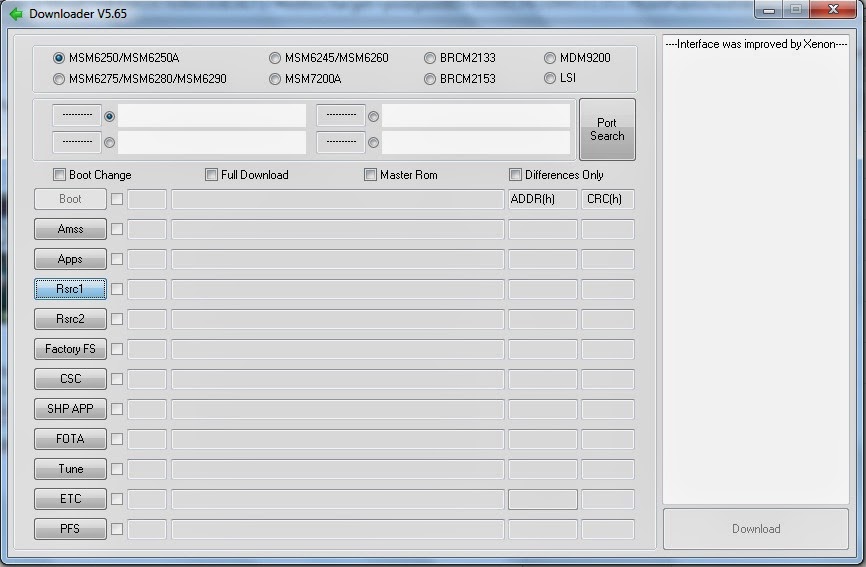
4. Now turn your corby off and then set it to download mode.
How to set to download mode?
Press and Hold VolumeDown+LockScreen+CallButton.
5. Connect your Phone on your computer using Samsung USB Cord. If your computer wont detect your device then you should download Samsung USB Driver: Download here: http://adf.ly/QhzLw
6. Going back to the multiloader, Click "PORT SEARCH" and then "Download".
7. Wait until installation is done.
If you have problems,clarifications or questions please leave a comment.
NOTE: Credits to the owner. CorbySociety do not intend to own this file.
Go to link Download
Tuesday, December 6, 2016
CORBY2 Firmware UI Broken Screen Lock V1
CORBY2 Firmware UI Broken Screen Lock V1

* Broken Screen Lock
* Screen Lock Music Player Changed
* Homescreen Menu Changed
* Widget Dock Changed
* Calculator Changed
* Visually Attractive
* Extra Tags
* Firmware for Corby 2
* Broken Screen Lock Firmware
* MODS for Corby 2
* GTS3850 Firmware
* Android Firmware
How to Install this Firmware ?
1.Download the Firmware here : http://adf.ly/RRk3n
2.Download Multiloader v5.61 here : http://adf.ly/iG8il
( If link doesnt work, try searching another from Google )
3. Open Multiloader.Click Rsrc1 and then inject the firmware you have downloaded.
4. Now turn your corby off and then set it to download mode.
How to set to download mode?
Press and Hold VolumeDown+LockScreen+CallButton.
5. Connect your Phone on your computer using Samsung USB Cord. If your computer wont detect your device then you should download Samsung USB Driver: Download here: http://adf.ly/QhzLw
6. Going back to the multiloader, Click "PORT SEARCH" and then "Download".
7. Wait until installation is done.
If you have problems,clarifications or questions please leave a comment.
NOTE: Credits to the owner. CorbySociety do not intend to own this file.
Go to link Download
Thursday, November 24, 2016
CORBY2 Firmware Android Broken Screen Lock
CORBY2 Firmware Android Broken Screen Lock

* Unique Menu Design
* Widget Dock Changed
* Calculator Changed
* Clock Changed
* Unique Screen Lock
* Extra Tags
* Android Firmware
How to Install this Firmware ?
1.Download the Firmware here : http://adf.ly/idHSG
2.Download Multiloader v5.61 here : http://adf.ly/iG8il
( If link doesnt work, try searching another from Google )
3. Open Multiloader.Click CSC and then inject the firmware you have downloaded.
4. Now turn your corby off and then set it to download mode.
How to set to download mode?
Press and Hold VolumeDown+LockScreen+CallButton.
5. Connect your Phone on your computer using Samsung USB Cord. If your computer wont detect your device then you should download Samsung USB Driver: Download here: http://adf.ly/QhzLw
6. Going back to the multiloader, Click "PORT SEARCH" and then "Download".
7. Wait until installation is done.
If you have problems,clarifications or questions please leave a comment.
NOTE: Credits to the owner. CorbySociety do not intend to own this file.
Go to link Download
Subscribe to:
Posts (Atom)