Showing posts with label on. Show all posts
Showing posts with label on. Show all posts
Sunday, March 12, 2017
Cyano Wiz V1 Pure Touchwiz Experience On CyanogenMod
Cyano Wiz V1 Pure Touchwiz Experience On CyanogenMod
CyanoWiz :: EXperience Touchwiz On CyanogenMod For the First Time ::

Features ::
Ported Touchwiz Apps ::
Downloads ::
Credits ::
*@Percy_g2 for the stable cyanogenmod rc1
*@Xda for a platform
*@team cyanogenmod for their support
*@samsung for the touchwiz interface
*Caliban666 for mirroring the Rom to mediafire
*Aniket.Lamba for mirroring the Rom to devhost
*@kaustubh.rockstar [me] for bringing this interface amongst you all...
Bugs ::
Installation ::
General Info ::
*about phone will fc at first boot
*no lockscreen at first boot
*booting will take time
Sources For Kernel/etc ::
Donation/Contribution In The Further Development Of This Project ::
Special Thanks to ::
*Gichik Kamin :: For the very first donation/testing and screenshots.
Enjoy Your Cyano-wiz
Features ::
Code:
 Include :: DESCRIPTION :
THIS ROM IS A CM7 ROM HAVING PERFECT TOUCHWIZ UI. IT IS FOR THOSE WHO LOVE TOUCHWIZ UI BUT WANT CM7 FEATURES.

I HAVE ADDED SOME MORE FEATURES, TWEAKS AND ENHANCEMENTS IN IT. THOSE ARE AS FOLLOWS.

Perfect Touchwiz UI (See screenshots).
Touchwiz Icons.
Added some original Touchwiz apps that are ported to cm7(not by me).
Used the 5docked Touchwiz Launcher.
Added original touchwiz fonts.
Everything is Touchwiz themed in this rom.
Original Samsung Bootanimation.
Original Touchwiz Lockscreen.
Status bar is also like Touchwiz.
No keyboard.
All CM7 features....!!!


NOTE : While playing bootanimation, the screen goes black for some time as it is a part of bootanimation. So, plz dont panic and dont remove battery...it will take some time for first reboot.
Ported Touchwiz Apps ::
Code:
All Share.apk
MyFiles.apk (File Manager).
LatinIME.apk (Samsung Keypad).
Mms.apk (Messaging App).
Touchwiz30.apk (Samsung Home).
Calculator.apk.
Memo.apk (Memo App).
TwWallpaperChooser.apk (Samsung Wallpapers).
TaskManager.apk.
Adservice.apk
BadgeProvider.apk
GpsSetup2.apk
SNSAccount.apk
SNSProvider.apk
PushService.apk
etc..
Quote:
ScreenShots ::         |
Downloads ::
Code:
Check post #2
*@Percy_g2 for the stable cyanogenmod rc1
*@Xda for a platform
*@team cyanogenmod for their support
*@samsung for the touchwiz interface
*Caliban666 for mirroring the Rom to mediafire
*Aniket.Lamba for mirroring the Rom to devhost
*@kaustubh.rockstar [me] for bringing this interface amongst you all...
Bugs ::
Code:
 *Same as cm7 rc1 by percy_g2/minor bugs
*No keyboard included [install one by yourself]
*about phone fc at first boot

*solution-- reboot your phone..
Code:
*First flash percys cm7 #2 kernel[format system/data/cache and reboot recovery]
*after booting into recovery--
#wipe data/wipe cache
#go to mounts and storage- *mount system
#select install from sdcard
#select cm-touchwiz-totoro.zip
#select yes
#reboot after completion
*about phone will fc at first boot
*no lockscreen at first boot
*booting will take time
Sources For Kernel/etc ::
Code:
 Include//

*no kernel is included in this rom.. refer to percy_g2s cm7 kernel#2 sources..
Code:
*You may, if you want can donate me some bandwidth as an Internet-recharge for my number...PM me first..
*You can work with me as a team
*You can help by uploading my files to d-h.st or mediafire
*Gichik Kamin :: For the very first donation/testing and screenshots.
Enjoy Your Cyano-wiz
Go to link Download

Monday, February 6, 2017
Disk On Chip 2000
Disk On Chip 2000
Disk On Chip 2000
Driver Info:
File: disk-on-chip_2000.zip
File size: 5.98 MB
Driver version: 2.53
Driver rating: 9.2 / 10
Total Downloads: 906
If you need disk on chip 2000, just click below. All drivers are scanned using antivirus software and 100% compatible with Windows OS.
Go to link Download
Sunday, January 29, 2017
Dont Miss Dinos22 on The Next OC Show!
Dont Miss Dinos22 on The Next OC Show!

Next weeks OC TV episode is sure to be a special one. GIGABYTEs very own Dino Dinos22 Strkljevic, our Australian Marketing Manager, will be on the show for an in-depth discussion on our overclocking-focused Z170X-SOC motherboard.
We build the Z170X-SOC motherboard with overclockers in mind, and theres no better venue to discuss in than on OC TV. You can watch the episode on November 15th at 9PM EST on Twitch. Watch live video from OverClockingTV on www.twitch.tv
Go to link Download
Thursday, December 15, 2016
Dont Miss Out on Your Chance to Go to Blizzcon!
Dont Miss Out on Your Chance to Go to Blizzcon!
As you might remember, we recently announced the Grand Prize Winners of the GIGABYTE Heroes of the Storm™ Sweepstakes as well as the 2nd Round of Winners for GIGABYTE Prizes. There are some great prizes on the list, which include GIGABYTE motherboards and a trip to Blizzcon in California!

We sent out an email to winners recently, but sometimes these get stuck in spam filters and wont make it to your inbox. You can check the full list of winners here.
If you won the Grand Prize of a free trip to Blizzcon well need to hear back from you ASAP! Dont lose your chance to go to Blizzcon!
Go to link Download
Saturday, November 26, 2016
Dangers rom 0 on tplink or router on your network
Dangers rom 0 on tplink or router on your network

You need to know, is actually very dangerous, if we do not know the dangers rom-0 on the network router or on your wifi network. Why it can be very dangerous ?
First : Rom - 0 is a separate room where there is a router or modem password encryption us , if you access the ip 192.168.1.1 to access your router it will display your username and password to proceed to the home page of the router administrator
Well now try to exercise your own by typing in your brouser, like this : http://192.168.1.1/rom-0 and look the file will be downloaded automatically, and then upload the file to the following address : http://198.61.167.113/zynos/ and look at the top line. now try to enter the admin for username and password at the top earlier.
look at this picture :


Thank You ;)
Go to link Download
Saturday, October 22, 2016
Create A Bootable USB Stick On Ubuntu With GNOME Disks Quick Tip
Create A Bootable USB Stick On Ubuntu With GNOME Disks Quick Tip
[Quick tip] Ubuntu Startup Disk Creator has been known to be buggy at times, so users have been looking for alternatives. Well, some might not be aware of this, but theres another GUI tool already installed by default in Ubuntu (w/ Unity) and Ubuntu GNOME, as well as other GNOME-based Linux distributions, which allows creating a bootable USB stick: GNOME Disks.
GNOME Disks is reliable, very easy to use and should already be installed if you use Ubuntu with Unity or GNOME.
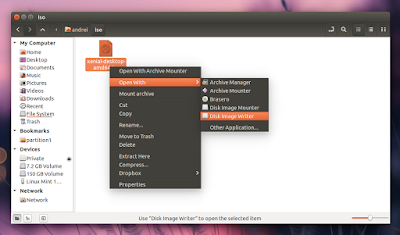
To create a live USB using GNOME Disks, open Nautilus, right click the Ubuntu (Fedora, etc.) ISO and select Open With > Disk Image Writer:
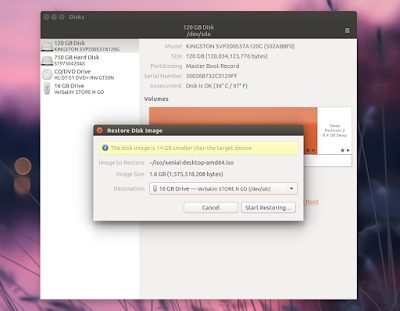
Next, simply select your USB drive as the Destination (and double check to make sure the drive you select under "Destination" is correct because the data on it will be destroyed!) and click "Start restoring...":
Note that this method doesnt support data persistence, so when starting up from this USB, the documents and settings will be discarded on shutdown.
And speaking of GNOME Disks and USB drives, you can also use this tool to format USB sticks, edit partition, create a disk image, change filesystem label and more.
In case youve removed GNOME Disks Utility or your Linux distribution doesnt provide it by default, install the "gnome-disk-utility" package. In Debian / Ubuntu (and derivatives), install it using the following command:
sudo apt-get install gnome-disk-utility
Go to link Download
Wednesday, October 5, 2016
Documents to Go View documents on Smartphones and Tablets
Documents to Go View documents on Smartphones and Tablets
Documents to Go
Android Apps to view Documents on Smartphones & Tablets.

Documents to Go is android app to edit office documents from your smartphones or tablets. This app also allow you to view Adobe files , desktop file sync,multiple cloud storage accounts, opening password-protected files. you can make your documents look professional ,use excel sheets , make slides using power point to present.present. Font style , bold,italic,bullets etc same as you use Microsoft office on PC.

Platform : Android
Developer : Dataviz
Play store : Download
Full Version: Download
Go to link Download
Subscribe to:
Posts (Atom)